Web Inventix AI

OPERATIONS AUTOMATION

Operations Automation

Connect routine steps across email, forms, spreadsheets, CRM, documents and internal systems while keeping ownership clear.

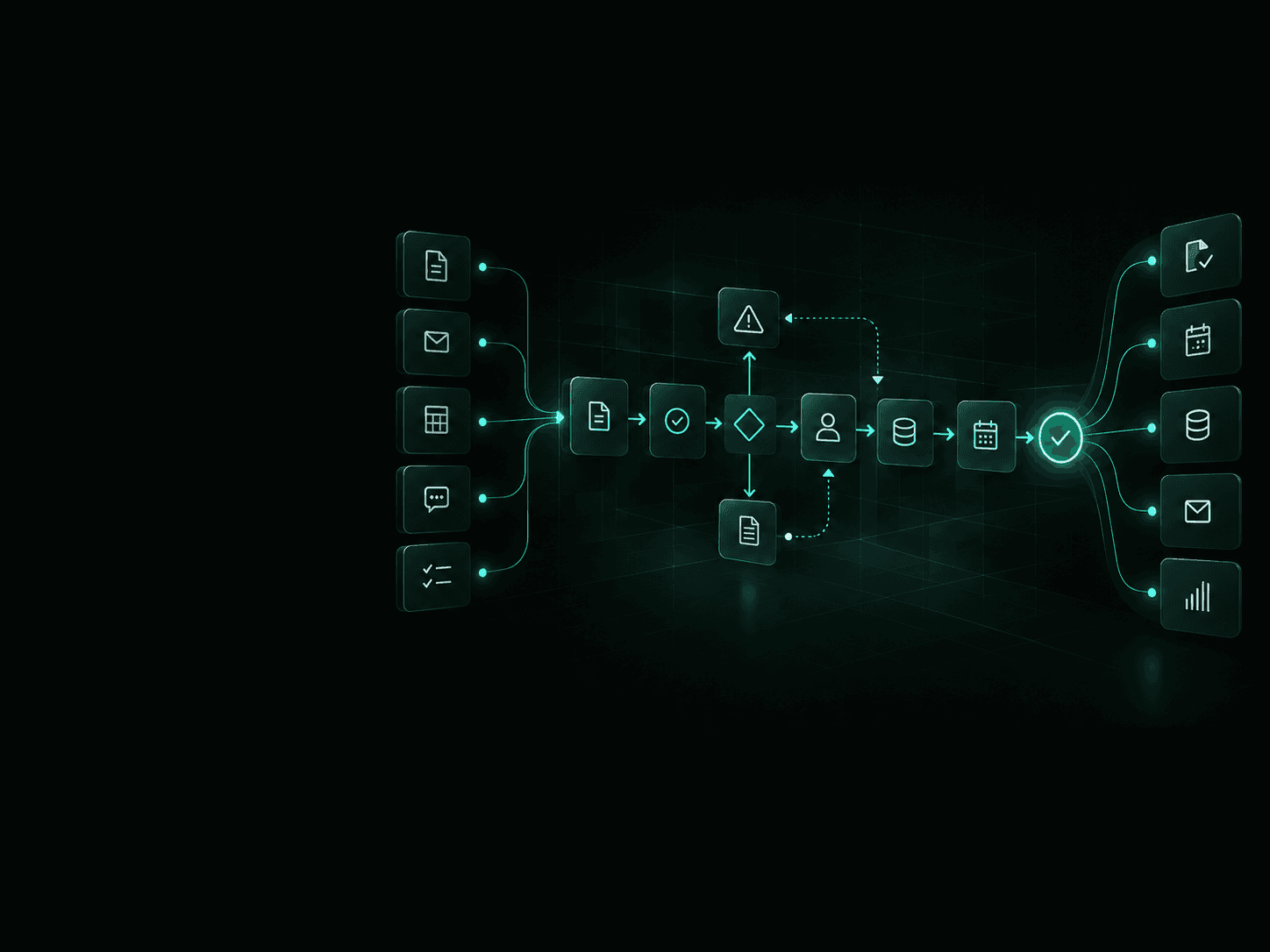
Operations automation workflow connecting requests, systems, approvals, tasks and business updates.

Where operations starts to slow down

Businesses often already have the software they need.

The friction usually appears in the handoffs between inboxes, forms, spreadsheets, CRMs, documents, shared drives and internal teams.

When people have to copy information, chase approvals, update statuses, move documents or remind the next person what to do, the workflow becomes slower and harder to track.

Operations automation connects those steps so information moves through the process with less manual coordination.

  1. 01

    Repeated data entry

    The same information gets entered into multiple systems or documents.

  2. 02

    Status chasing

    Staff have to ask what happened, who owns the next step or when something will be completed.

  3. 03

    Approval delays

    Work sits in email, chat or an inbox waiting for someone to review it.

  4. 04

    Manual handoffs

    The next step depends on someone remembering to send a file, create a task or notify another person.

Good candidates for automation

The strongest candidates are repeatable, rules-based processes triggered by known events and supported by information you already have.

Human review can remain part of the workflow where context or judgement is required.

  • Data entry between systems

    Move approved information between forms, CRM, spreadsheets, accounting software and internal systems without asking people to enter it again.

  • Quote and intake collection

    Collect required information, check that required fields are complete and route the request to the right person.

  • Internal approvals

    Send requests to defined reviewers, record their decisions and continue the workflow based on the result.

  • Document routing

    Classify, rename, store and route documents according to agreed business rules.

  • Customer onboarding

    Coordinate forms, document requests, account setup, internal tasks, reminders and handoffs.

  • Meeting actions

    Turn approved meeting notes into assigned tasks, owners, deadlines and follow-up reminders.

  • Recurring reporting

    Collect information from approved systems and prepare scheduled operational reports or summaries.

  • Status notifications

    Notify customers or internal teams when a job, case, request, approval or other process changes status.

See the workflow end to end

Useful automation follows a process from the event that starts it through to the required outcome.

Instead of automating one click, we look at the handoffs surrounding the work.

  1. 01

    Request received

  2. 02

    Information checked

  3. 03

    Systems updated

  4. 04

    Approval if required

  5. 05

    Tasks created

  6. 06

    People notified

  7. 07

    Status recorded

MANUAL WORKFLOW

  1. A request arrives by email.
  2. Someone copies the details into another system.
  3. A document gets saved manually.
  4. A manager is asked for approval.
  5. Someone creates the next task.
  6. The customer or internal team gets an update.
  7. Another spreadsheet or report gets updated later.

CONNECTED WORKFLOW

  1. The request is captured automatically.
  2. Required information is checked.
  3. Approved systems are updated.
  4. The request is routed to the correct person.
  5. Approval is requested when required.
  6. Tasks and notifications are created.
  7. The workflow records the result and status.

The goal is not to remove people from the process.

The goal is to remove unnecessary coordination around the work people still need to do.

Automate the routine. Keep people in control.

Automation should handle predictable work.

People should review exceptions, sensitive decisions and situations that depend on business context or professional judgement.

We can design approval points into the workflow so work pauses, goes to the correct reviewer and continues only after the required decision has been recorded.

Automation can handle

  • Routing information
  • Moving approved data
  • Creating tasks
  • Preparing documents
  • Sending reminders
  • Updating records
  • Sending status notifications
  • Preparing recurring reports

People can stay responsible for

  • Non-standard cases
  • Customer commitments
  • Sensitive approvals
  • Financial decisions
  • Legal or compliance decisions
  • Employment decisions
  • Professional judgement
  • Final sign-off

We can also define what happens when information is missing, a system is unavailable, duplicate records appear or the workflow encounters something outside its normal rules.

Use what you already have

Most operations automation projects should start by improving the systems already running your business.

That may include Microsoft 365, Google Workspace, CRM platforms, accounting software, forms, cloud storage, communication tools, automation platforms and standard APIs.

We connect the required systems, improve the handoffs between them and add custom development only when the workflow or integration requirements justify it.

You should not have to replace useful software simply to automate the process around it.

Integrations

Connect the platforms your business already uses. Web Inventix AI can integrate CRM, communications, payments, AI, marketing, operations and automation tools into connected workflows.

Examples of platforms and systems we can work with include:

  • OpenAI
  • Microsoft
  • Google
  • HubSpot
  • Salesforce
  • Twilio
  • Stripe
  • Slack
  • Shopify
  • Meta
  • n8n

Start with the workflow

We document the process before deciding what should be automated.

The goal is to improve the operation first, then choose the simplest practical way to support it.

  1. 01

    Map the workflow

    Identify the trigger, inputs, systems, handoffs, decisions, exceptions, owners and required outcome.

  2. 02

    Remove unnecessary steps

    Simplify the process before automating it.

    There is little value in automating work the business no longer needs.

  3. 03

    Build the smallest useful workflow

    Start with one process, one handoff or one operating problem that can produce measurable value.

  4. 04

    Test real scenarios

    Test normal cases along with incomplete information, duplicate records, permission issues, failed connections and unexpected inputs.

  5. 05

    Launch and monitor

    Track workflow activity, exceptions and operating results so the automation can be adjusted as the process changes.

Measure the result, not the automation

An automation is useful only when the operating result improves.

Before launch, we can define the baseline and identify the measures that matter for the workflow.

  1. 01

    Cycle time

    How long the process takes from trigger to completion.

  2. 02

    Manual touches

    How many repetitive actions or handoffs require staff involvement.

  3. 03

    Response time

    How long work waits before the next required action occurs.

  4. 04

    Errors and rework

    How often information needs correction or manual recovery.

  5. 05

    Backlog

    How much work is waiting, overdue or stuck between steps.

  6. 06

    Exception rate

    How often the workflow requires manual intervention outside its normal rules.

The right measures depend on the workflow.

The objective is to create a clear before-and-after operating picture rather than claiming generic productivity improvements.

Start with one workflow

Bring us one process that is slow, repetitive, difficult to track or dependent on people copying information between systems.

We can map the current workflow, identify the bottlenecks and determine the smallest practical automation worth building first.

No large platform rebuild is required to get started.

Frequently Asked Questions

What makes a workflow a good automation candidate?

Processes are usually good candidates when the steps are repeatable, the rules can be described clearly and the required information is available in systems you already use.

Processes involving large amounts of judgement or frequent exceptions may still benefit from partial automation.

Can automation work across several systems?

Yes.

A workflow can connect several supported systems through native integrations, automation platforms, webhooks or APIs.

The exact approach depends on the systems involved, permissions, available integrations and the data that needs to move between them.

Can we keep manual approval steps?

Yes.

A workflow can pause at defined points, notify the appropriate reviewer and continue after the required decision has been recorded.

What happens if information is missing or something fails?

We can design exception handling into the workflow.

That may include validation rules, retries, alerts, manual review queues or escalation to a designated person.

Do we have to replace our current software?

Usually not.

Our starting point is to work with the systems you already have and improve the connections between them.

Replacement should only be considered when the existing system itself is preventing the required outcome.

Do you automate spreadsheets?

Yes, when a spreadsheet remains an appropriate part of the process.

We can connect spreadsheets to forms, databases, CRM platforms, reporting systems and other approved tools.

If a spreadsheet has become a fragile substitute for a proper system, we may recommend another approach.

What if our process is poorly documented?

That is common.

The first step can be mapping the current workflow with the people who actually perform the work.

This often identifies unnecessary steps and unclear ownership before any automation is built.

Can the automation change as our process changes?

Yes.

Workflows should be documented and structured so rules, integrations and process steps can be updated as the business changes.