Web Inventix AI

AI CUSTOMER SUPPORT AGENTS

AI Customer Support Agents

Answer approved routine questions, collect details and route complex or sensitive issues to the human support team.

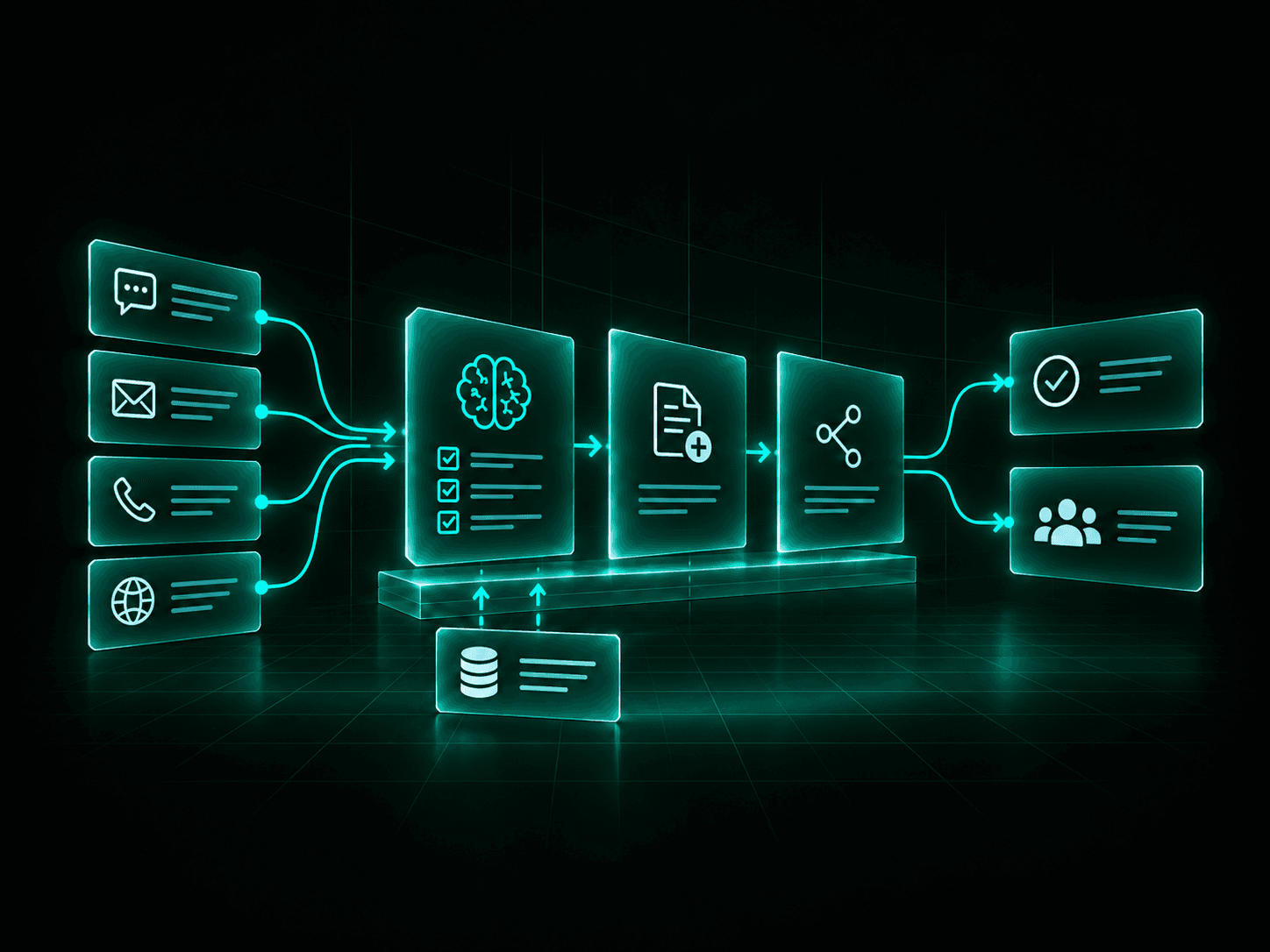
AI customer support workflow connecting customer channels, approved knowledge, system actions and human escalation.

Where customer support gets stuck

Support teams often spend a large part of the day answering the same questions, collecting the same information and moving details between systems.

The problem is rarely the support team. It is the amount of repetitive work surrounding each customer request.

  1. 01

    Repeated questions

    Customers repeatedly ask about policies, services, orders, appointments, account information and common issues.

  2. 02

    Slow first response

    Requests wait in queues when staff are busy, unavailable or working through higher-priority cases.

  3. 03

    Manual information gathering

    Support staff repeatedly collect names, account details, order numbers, issue descriptions and other information before work can begin.

  4. 04

    Disconnected support systems

    Information may need to move manually between chat, email, ticketing systems, CRMs and internal tools.

Handle routine support without putting every request in the queue

An AI customer support agent can handle defined parts of the support process before a team member needs to get involved.

It can answer approved questions, gather information, identify the request, complete permitted actions and route the conversation when human help is needed.

  1. 01

    Respond immediately

    Give customers an immediate first response instead of making routine requests wait for an available team member.

  2. 02

    Handle repeatable requests

    Automate common questions and defined support workflows that follow predictable rules.

  3. 03

    Capture better information

    Collect the details your support team needs before a request reaches them.

  4. 04

    Escalate with context

    Send the customer, issue details and conversation summary to the right person or queue.

A typical customer support flow

The agent follows a defined workflow instead of improvising across your business systems.

  1. 01

    Customer request

    A customer asks a question or requests support.

  2. 02

    Identify intent

    The agent determines what the customer is trying to accomplish.

  3. 03

    Gather context

    It collects the information required for the request.

  4. 04

    Check approved knowledge

    The agent retrieves relevant information from approved sources.

  5. 05

    Respond or take action

    It answers the question or completes a permitted support action.

  6. 06

    Update the system

    The conversation, ticket or customer record can be updated automatically.

  7. 07

    Resolve or escalate

    The request closes or moves to the appropriate support person with context attached.

What an AI customer support agent can handle

Start with repeatable support work where the information, rules and permitted actions can be clearly defined.

  • Routine questions

    Answer approved questions about products, services, policies, processes, availability and common support topics.

  • Customer intake

    Collect names, contact details, account information, order numbers and other details required to process the request.

  • Intent and issue classification

    Identify the type of request and route it to the correct queue, department or workflow.

  • Ticket creation and updates

    Create support tickets, add customer details, capture conversation summaries and update existing records.

  • Approved account information

    Provide permitted information such as order status, appointment details or service information after the required verification.

  • Guided troubleshooting

    Walk customers through approved troubleshooting steps for common issues and known problems.

  • Conversation summaries

    Create a concise summary of the issue, customer information collected and actions already completed.

  • Human handoff

    Transfer the customer when the request falls outside the agent's approved scope or requires human judgement.

Support customers across your existing channels

The same support workflow can be adapted to the channels your customers already use.

  1. 01

    Website chat

    Answer questions and handle defined support requests directly from your website.

  2. 02

    Customer portals

    Provide support inside authenticated customer or member environments.

  3. 03

    Messaging

    Handle approved customer conversations through supported messaging channels.

  4. 04

    Email

    Classify inbound support requests, prepare responses, collect information and create or update tickets.

  5. 05

    Voice

    Connect customer support workflows with an AI voice agent when phone support is part of the service model.

  6. 06

    Internal support

    Give employees access to approved operational, product or policy information through an internal support agent.

Channel availability depends on your existing systems, permissions and the workflow being implemented.

Use approved business knowledge

Answers should come from information you control

An AI customer support agent should answer from approved business information rather than unrestricted sources.

Knowledge can include:

  • Help centre articles
  • Frequently asked questions
  • Product and service information
  • Policies and procedures
  • Support scripts
  • Troubleshooting guides
  • Internal documentation
  • Approved customer-facing content

Control what the agent can use

You define which information sources the agent can access and which actions it can perform.

Content that is outdated, confidential or inappropriate for customer use should stay outside the agent's approved knowledge sources.

  1. Approved Knowledge
  2. AI Support Agent
  3. Customer Response

Connect the agent to the rest of your support workflow

A useful support agent does more than answer questions.

Where appropriate, it can connect with the systems involved in handling the customer request.

  1. 01

    CRM

    Read or update approved customer and account information.

  2. 02

    Help desk

    Create tickets, update existing cases and route requests.

  3. 03

    Knowledge base

    Retrieve approved support content and troubleshooting information.

  4. 04

    Scheduling

    Check availability or create appointments when permitted.

  5. 05

    Order and account systems

    Retrieve approved status information after the required customer verification.

  6. 06

    Notifications

    Trigger email, SMS or internal alerts when specific conditions occur.

We map the workflow first, then determine which systems need to exchange information. You do not need to replace your existing support stack simply to introduce an AI agent.

Keep humans where judgement matters

AI should handle predictable support work, not every customer situation.

You define the conditions that require human involvement.

  1. 01

    Customer request

    The customer asks to speak with a person.

  2. 02

    Unsupported request

    The issue falls outside the agent's approved knowledge or workflow.

  3. 03

    Sensitive issue

    The conversation involves complaints, disputes, refunds, legal matters or another situation requiring human review.

  4. 04

    Failed verification

    The agent cannot complete the required identity or account checks.

  5. 05

    Repeated failure

    The customer remains stuck after approved troubleshooting steps.

  6. 06

    Priority customer or issue

    Business rules identify the request for immediate human attention.

When a conversation is transferred, the support team can receive the information already collected, the conversation history and a summary of the request.

See what the support agent is actually doing

AI support should be measurable.

Depending on the implementation, reporting can track areas such as:

  1. 01

    Conversation volume

    How many customer requests reach the agent.

  2. 02

    Request categories

    What customers contact support about most often.

  3. 03

    Automated resolutions

    Which approved requests are completed without human intervention.

  4. 04

    Escalations

    Which conversations require the support team and why.

  5. 05

    Unanswered questions

    Where the current knowledge base does not provide enough information.

  6. 06

    Workflow performance

    Where customers abandon, repeat requests or encounter problems.

This information can help your team improve support workflows, identify missing knowledge and decide where additional automation makes sense.

Built around your current support environment

We start with the customer support workflow and the systems already involved.

The solution may connect approved knowledge, your help desk or CRM, website chat, messaging, email, internal APIs and other business systems required for the workflow.

The implementation can use existing platforms, custom integrations or purpose-built components based on your requirements.

The agent receives only the permissions required to perform its defined role.

A support-agent implementation can define:

  • Approved knowledge sources
  • Permitted actions
  • Authentication requirements
  • Escalation rules
  • Human handoff
  • Conversation logging
  • Error handling
  • Testing scenarios
  • Reporting
  • Ongoing monitoring

The goal is not to introduce another disconnected support tool. It is to improve the workflow your team already operates.

Start with one support workflow

You do not need to automate your entire support operation at once.

Start with a support area that receives repeated requests and has clear information, rules and outcomes.

  1. 01

    Map the current workflow

    Review the questions customers ask, where requests arrive, how your team responds and which systems are involved.

  2. 02

    Select the first use case

    Choose a repeatable support workflow with clear boundaries and enough volume to justify improvement.

  3. 03

    Build and test

    Connect the required knowledge and systems, configure permissions and test expected and unexpected customer requests.

  4. 04

    Launch and measure

    Release the agent into the approved channel, monitor conversations and improve the workflow using actual support data.

Good places to start

Some support workflows are better starting points than others.

  1. 01

    Frequently asked questions

    High-volume questions with approved, stable answers.

  2. 02

    Order or service status

    Requests where customers repeatedly contact staff for basic status information.

  3. 03

    Appointment support

    Booking, rescheduling, confirmation and common appointment questions.

  4. 04

    Customer intake

    Collecting information before a support employee takes over.

  5. 05

    Basic troubleshooting

    Repeatable diagnostic steps with defined escalation points.

  6. 06

    Ticket triage

    Classifying incoming requests and routing them to the correct support queue.

The first workflow should be narrow enough to control and meaningful enough to measure.

Frequently Asked Questions

Can the agent answer from our existing help centre or support documents?
Yes. Approved knowledge sources can include help centre content, FAQs, product documentation, policies, troubleshooting guides and other selected business information.
Can customers still speak with a person?
Yes. Human escalation can be built into the workflow based on customer requests, business rules or situations the agent should not handle.
Can the agent create or update tickets?
If the support platform provides the required integration or API access, the agent can be configured to create tickets, add information and update approved fields.
Will this replace our customer support team?
The goal is to handle defined repetitive work and give your team better information when human support is required. Complex, sensitive or judgement-based issues should remain with people.
Can the agent access customer-specific information?
It can access approved information when the required authentication, permissions and integrations are in place. Access should be limited to what the support workflow requires.
Can the agent work across multiple channels?
Yes, depending on the systems and channels being used. A support workflow may operate through website chat, customer portals, messaging, email, voice or internal interfaces.
How do you control what the agent is allowed to do?
We define approved knowledge, system permissions, actions, business rules, escalation conditions and human handoff before deployment.
Do we need custom software?
Not necessarily. Some projects can use existing support platforms and integrations. Others require custom workflow components or API connections.
How do you know if an AI support agent is a good fit?
A good starting workflow usually has repeated requests, clear information, predictable decisions and measurable outcomes.
Can we start with one workflow?
Yes. In most cases, we recommend starting with one high-value support workflow, measuring the results and expanding after it performs reliably.